






Introduction
In part one of this series, we analyzed Acronis telemetry from over 1.8 million managed endpoints to map the RMM tool risk facing SMBs and MSPs. The data showed that 63% of endpoints run more than one remote access tool — a proliferation that may lead to problems, as multiple RMM tools, especially if unused, increase a company’s attack surface unnecessarily.
Widely trusted tools like ConnectWise ScreenConnect and AnyDesk may be abused by attackers, and when left unattended, they can present a problem: their legitimate prevalence makes attacker activity harder to spot, and any vulnerabilities affecting them can turn a trusted platform into an infection vector.
Additionally, we’ve found that tools like MeshAgent and Ammyy Admin showed up in EDR incidents far more often than in legitimate IT deployments, demonstrating how some tools are far more likely to be used as part of an attack than others.
Knowing which tools are being abused is only part of the picture. The harder question is what to actually do about it. In this second part, we move from analysis to action, walking through concrete hardening guidance for the protocols and tools most commonly weaponized in our dataset — RDP, ScreenConnect, MeshAgent and VNC — and providing a practical framework for distinguishing attacker-deployed tools from legitimate ones using MITRE ATT&CK tactic combinations. For SMBs and MSPs who manage dozens or hundreds of endpoints, this is where the information can be put to practice.
Remote access tool hardening
If you haven’t done so yet, refer back to our previous blog on the topic, The remote access blind spot: An analysis of RMM tool risk for SMBs to learn about the data surrounding RMM risk. But now that we know what RMM tools attackers are bringing and how they're using them, how can this telemetry, and the underlying technical methods used, point us to hardening priorities? Let’s examine some of the most prevalent RMM tools and remote access protocols and see which ones can be addressed, and how.
RMM or RDS?
An important distinction is the difference between RMM as a whole and remote desktop software (RDS) in particular. While our report addresses RMM software broadly, this hardening guide focuses more narrowly on RDS and the components within RMM software that enable remote access. This is because remote access remains an integral part of modern attack infrastructure, and while RMM software normally contains many other capabilities, abuse of those capabilities is not commonly present in attack data.
RDP: The highest number of incidents and the most abused protocol
RDP is the most commonly abused remote access protocol in our dataset. The attack techniques our EDR observed fall into three categories.
Unauthorized enablement
Attackers who gain initial access through other means (phishing, exposed services, stolen credentials) frequently enable RDP on machines where it was disabled. In approximately 20% of attacks involving RDP, our EDR detected attackers modifying Windows registry keys to enable Remote Desktop connections, disabling the Network Level Authentication requirement, and turning off the "deny Terminal Server connections" setting. These modifications are often combined with creating new local administrator accounts. In one set of incidents, the full attack chain involved creating a local admin account, modifying the registry to allow RDP, and changing accessibility feature binaries for sticky-key-style backdoor access.
Multisession abuse
A large number of incidents across dozens of customers involved RDPWrap, a tool that enables concurrent RDP sessions on Windows editions that normally don't support them. Attackers install this to maintain RDP access even while a legitimate user is logged in at the console, avoiding the session-switch notification that would alert the user.
Credential extraction
Dozens of incidents involved tools that extract saved RDP passwords from the Windows credential store. These passwords are then used to move laterally to other machines on the network.
What to do:
- Disable RDP on machines that don't require it through Group Policy.
- Block RDP at the perimeter. If remote access is required, route it through a VPN or ZTNA gateway.
- Enforce Network Level Authentication.
- Audit RDP enablement status regularly. Any machine where RDP is newly enabled without a change request should be investigated.
- Monitor for RDPWrap installation on non-server operating systems.
MITRE ATT&CK TTPs mentioned in the above scenario: T1021.001 (Remote Desktop Protocol), T1112 (Modify Registry), T1136.001 (Create Account: Local Account), T1546.008 (Accessibility Features)
ConnectWise ScreenConnect: From vulnerability exploitation to trojanized installers
ConnectWise ScreenConnect is the second most widely deployed RMM platform in our dataset, after Acronis RMM, and it has been targeted through multiple attack vectors over the past two years. This is not unique to ScreenConnect — the advice provided for ConnectWise RMM products applies to most RMM products, and the same risks exist for many other RMM tools.
One such vector is vulnerability exploitation. CVE-2024-1709, for example, provided a trivially exploitable authentication bypass (CVSS 10.0) that allowed attackers to create admin accounts on unpatched servers. With 8,200+ internet-exposed instances, it was mass-exploited within 48 hours of disclosure.
The more persistent threat is trojanized installers. Since March 2025, Acronis TRU documented attackers distributing cracked ScreenConnect installers that connect victims to attacker-controlled infrastructure. Newer variants use ClickOnce runners that download components at runtime, complicating static detection.
Once installed, attackers leverage ScreenConnect's built-in automation to deploy malware within minutes, typically AsyncRAT, a custom PowerShell RAT and PureHVNC RAT simultaneously. The dual-RAT approach provides redundancy and may indicate shared infrastructure across multiple operators.
Our EDR data contains incidents where ScreenConnect appeared alongside credential theft, keyboard hooking, process injection and ransomware indicators.
What to do:
- Patch ScreenConnect servers immediately and continuously. The CVE-2024-1709 fix has been available since February 2024.
- Block access to the ScreenConnect setup wizard after initial configuration.
- Enforce MFA for all ScreenConnect admin accounts.
- Audit ScreenConnect agent installations on endpoints. If an agent connects to a server URL your organization doesn't control, treat it as compromise.
- Consider application allowlisting to prevent ScreenConnect installations that don't originate from your authorized server.
MITRE ATT&CK TTPs mentioned in the above scenario: T1190 (Exploit Public-Facing Application), T1219 (Remote Access Software), T1059.001 (PowerShell)
MeshAgent: the tool attackers deploy most, and why it resists removal
MeshAgent is the open-source agent component of MeshCentral. Across our dataset, it is the single most frequently deployed tool by attackers, appearing in hundreds of incidents.
MeshAgent can install itself as a Windows service, lock its binary files, and auto-restart after termination. Attackers who deploy it as a persistence mechanism take advantage of these capabilities to make removal difficult. This is consistent with observed attack patterns: the Medusa ransomware group, for instance, drops MeshAgent binaries directly alongside web shells, often under protected system paths.
What to do:
- If your organization does not use MeshCentral, treat any MeshAgent presence as a confirmed indicator of compromise.
- Block MeshAgent binaries via application control.
- Monitor for outbound connections to MeshCentral relay infrastructure.
- If quarantine fails, escalate to manual incident response. Automated removal may not succeed against an attacker who has established persistence.
MITRE ATT&CK: T1219 (Remote Access Software), T1105 (Ingress Tool Transfer) and T1543.003 (Windows Service)
VNC: 96% malicious detection rate
Of the hundreds of EDR incidents involving VNC variants, primarily UltraVNC, 95.8% were classified as malicious. EDR incidents are categorized as suspicious, rather than malicious, when a tool is flagged mainly for being present or behaving ambiguously; our findings show this rarely happens with VNC, whose detections are overwhelmingly clear-cut attacker activity.
The attack patterns include hundreds of cases of attackers deploying hidden VNC servers that run in a separate desktop session invisible to the user at the console, attackers using VNC password extraction tools to harvest saved credentials for lateral movement in 10%-20% of incidents on average, and, in some cases, attackers deploying trojanized VNC variants.
In January 2025, the GamaCopy campaign distributed UltraVNC disguised as "OneDrivers.exe" via spear-phishing. Microsoft classifies UltraVNC as a HackTool in Defender.
What to do:
- If VNC is not an authorized tool in your environment, block it.
- If it is required, enforce encryption, use strong unique passwords, restrict listener ports via firewall rules, and use IP allowlisting.
- VNC processes running from temporary or user-writable directories are almost certainly attacker-deployed.
MITRE ATT&CK TTPs mentioned in the above scenario: T1021.005 (VNC), T1219
Identifying and blocking attacker-deployed remote tools
A tiered approach to remote access tool control
Based on our telemetry, remote access tools fall into three tiers based on their risk profile.
Block unless explicitly authorized
These tools appear in our EDR data overwhelmingly or exclusively in attack contexts, with very few legitimate installations. Unless your organization has a documented use case, block them at the application control level: MeshAgent/MeshCentral and Ammyy Admin.
Monitor and harden
These tools have legitimate use cases, and show up frequently as legitimate tools, but are also frequently weaponized through deployment of unauthorized instances or exploitation of vulnerabilities: VNC/UltraVNC, RDP, Tactical RMM, and Action1. For these, enforce strict deployment policies, patch quickly, require MFA, and investigate any instance that wasn't deployed through authorized channels.
Audit and maintain
Mainstream RMM and remote access tools with low malicious-to-legitimate ratios include ConnectWise ScreenConnect, AnyDesk, TeamViewer, and Splashtop. These tools still require hardening: patching, MFA, authorized-instance tracking, and regular audits of which endpoints have them installed. The ScreenConnect trojanized-installer campaign mentioned above shows that even well-established tools can be weaponized, even if the legitimate, non-trojanized version is fully patched.
Key MITRE ATT&CK references
Practical detection checklist for SMBs and MSPs
Inventory your remote access tools
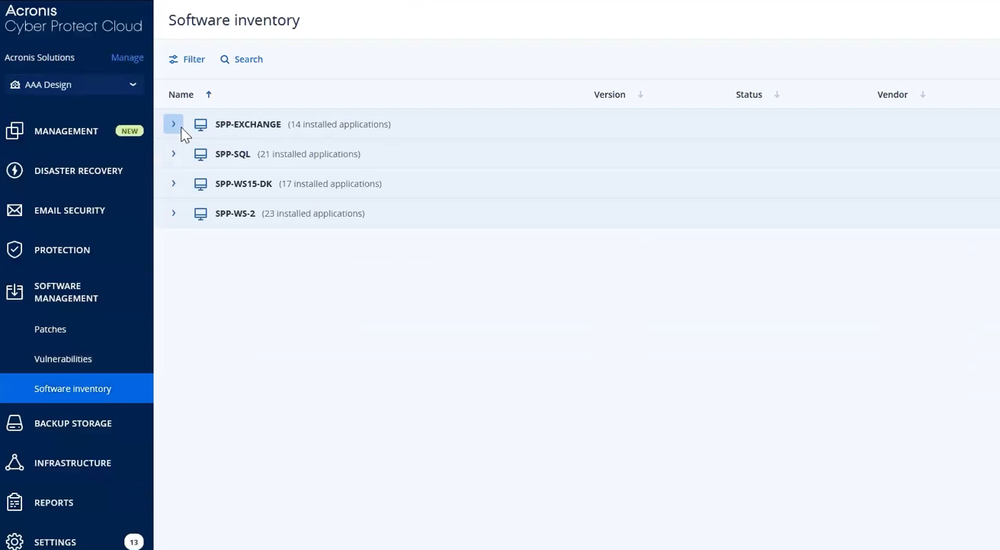
Know which tools are authorized and on which endpoints. Everything else is a suspect. Our data shows 63% of endpoints have multiple remote access tools, and many of those extra installations may be redundant. With Acronis Cyber Platform (formerly Acronis Cyber Protect Cloud), you can monitor and investigate installed software on endpoints using “Software Inventory.”
Monitor alerts and detections involving attacker-favored remote access tools
MeshAgent, Ammyy Admin, and hidden VNC variants have no place in most SMB environments. Blocking them via application control removes the attacker’s most common deployment options. Organizations should also investigate any newly installed RMM agent that lacks a corresponding deployment record.
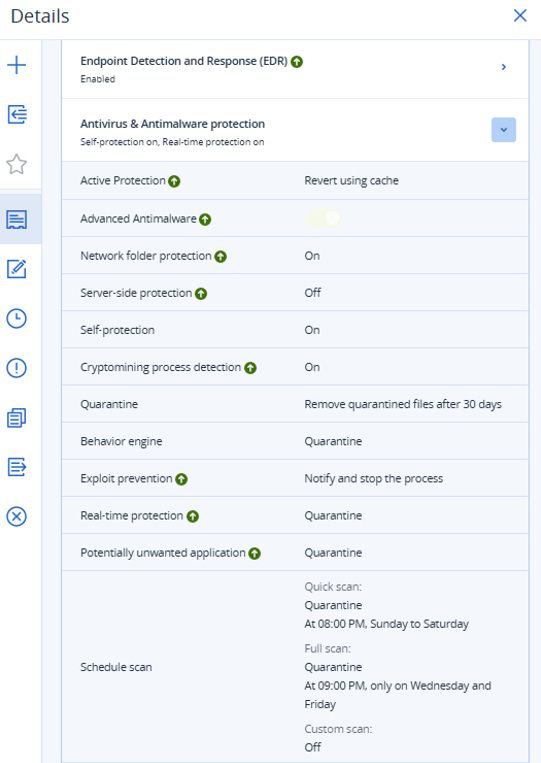
The ScreenConnect trojanized-installer campaigns show that attackers are distributing RMM tools through phishing disguised as official documents. With Acronis Cyber Platform (formerly Acronis Cyber Protect Cloud), enable EDR in the protection plan and make sure the behavioral engine, real-time protection, and potentially unwanted application settings are set to quarantine, as these settings can help detect and quarantine suspicious or unwanted RMM-related activity.
Watch for lateral movement
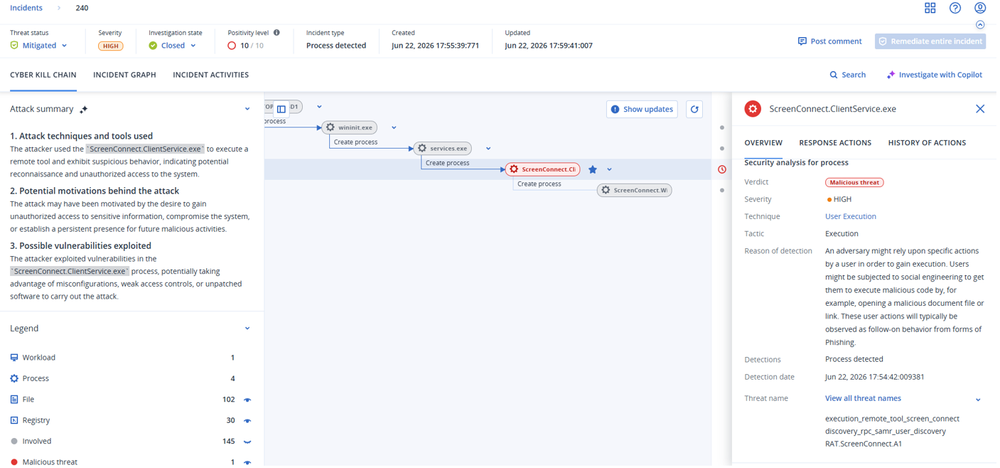
The strongest signal in our data is when a remote access tool appears along CLI, C2, lateral movement. This pattern is malicious 99% of the time. Acronis Cyber Platform (formerly Acronis Cyber Protect Cloud) EDR / XDR maps every incident to MITRE ATT&CK and can provide context and assistance with investigation and remediation.
Immediately patch RMM infrastructure
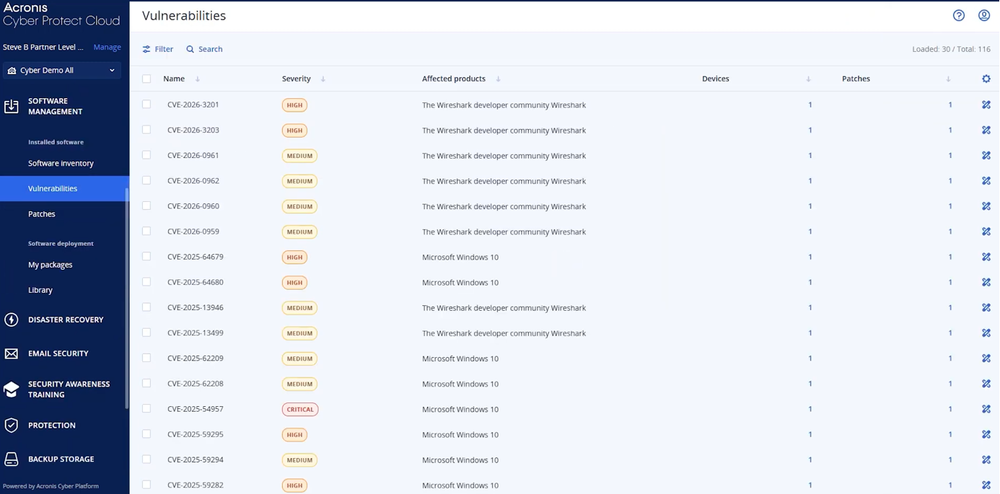
ConnectWise ScreenConnect (CVE-2024-1709), BeyondTrust (CVE-2024-12356, CVSS 9.8), and SimpleHelp (CVE-2024-57727) were all exploited quickly after disclosure. Internet-facing RMM servers are high-value targets. With Acronis Cyber Platform (formerly Acronis Cyber Protect Cloud), you can run “Vulnerability Assessment” to surface affected versions, then apply updates through vendor-supported installers, built-in update workflows, or standard OS-native software deployment mechanisms.
Reduce tool sprawl
Consolidate to the minimum set of remote access tools your operations require. Uninstall tools from previous providers. Every additional tool is another surface to patch, audit, and monitor. With Acronis Cyber Platform (formerly Acronis Cyber Protect Cloud), use “Software Inventory” to identify redundant and unused remote management applications and remove them accordingly.
Conclusion
In this report, we translate the risk picture presented in our previous blog into a practical hardening playbook. The tiered framework introduced here — block, monitor and harden, audit and maintain — gives IT teams a repeatable way to manage remote access tool risk without requiring security expertise for every decision.
Tools like MeshAgent and Ammyy Admin belong in the block tier based on their ratio of malicious to legitimate use. Tools like ScreenConnect and AnyDesk, despite their widespread legitimate deployment, still require strict controls: MFA, authorized-instance tracking and immediate investigation of any agent connecting to an unrecognized server.
Reducing tool sprawl, auditing what's installed versus what's authorized and patching internet-facing RMM infrastructure aggressively are the three actions with the highest return. Attackers are using the same tools IT teams use — the difference is in the controls wrapped around them.