




Back to homepage
  • For MSPs
  • AI-Native
Search in acronis websites
Login for
  • Service ProvidersAcronis Cyber Protect Cloud
  • Business CustomersAccess business security, backup, and deployment products
  • Home UsersAcronis True Image
  • Acronis Partner PortalPartner resources, training, certifications, and business tools.
  • ConnectAcronis Cyber Protect Connect
  • For MSPs
  • AI-Native

Contact us

  • Contact Sales
  • Contact Support
  • Contact Renewals
  • All Contacts
Search
Try Now
Choose region and language
Americas
  • BrasilPortuguês
  • CanadaEnglish
  • CanadaFrançais
  • LATAMEspañol
  • United StatesEnglish
Asia-Pacific
  • AustraliaEnglish
  • Chinese Simplified简体中文
  • Chinese Traditional繁體中文
  • IndiaEnglish
  • Japan日本語
  • Korea한국어
  • SingaporeEnglish
Europe, Middle East and Africa
  • BulgariaБългарски
  • CzechČeština
  • EuropeEnglish
  • FranceFrançais
  • GermanyDeutsch
  • HungaryMagyar
  • Israelעברית
  • ItalyItaliano
  • NetherlandsDutch
  • PolandPolski
  • RomaniaRomână
  • SpainEspañol
  • SwedenSvenska
  • SwitzerlandDeutsch
  • TürkiyeTürkçe
  • United KingdomEnglish
Worldwide
  • GlobalEnglish
  • Americas
    • BrasilPortuguês
    • CanadaEnglish
    • CanadaFrançais
    • LATAMEspañol
    • United StatesEnglish
  • Asia-Pacific
    • AustraliaEnglish
    • Chinese Simplified简体中文
    • Chinese Traditional繁體中文
    • IndiaEnglish
    • Japan日本語
    • Korea한국어
    • SingaporeEnglish
  • Europe, Middle East and Africa
    • BulgariaБългарски
    • CzechČeština
    • EuropeEnglish
    • FranceFrançais
    • GermanyDeutsch
    • HungaryMagyar
    • Israelעברית
    • ItalyItaliano
    • NetherlandsDutch
    • PolandPolski
    • RomaniaRomână
    • SpainEspañol
    • SwedenSvenska
    • SwitzerlandDeutsch
    • TürkiyeTürkçe
    • United KingdomEnglish
  • Worldwide
    • GlobalEnglish
Acronis True Image
FOR HOME
MenuMenu
Acronis True Image
Overview
Backup
Cloning
Security
  • Backup features
    Easy BackupEmail BackupAutomatic BackupCloud BackupMobile BackupBackup ReplicationImaging SoftwareData MigrationData RecoverySurvival Kit
  • Security features
    Anti-Malware SoftwareIdentity ProtectionAntivirus SoftwareActive ProtectionReliable CybersecurityCryptojacking BlockerSecurity for MacData Protection
  • Solutions
    Gaming SecurityCloud Photo StorageElectronic SignatureMobile App
All features
Compare
Backup
Cloning
Security
Product features
Backup features
Easy Backup
Email Backup
Automatic Backup
Cloud Backup
Mobile Backup
Backup Replication
Imaging Software
Data Migration
Data Recovery
Survival Kit
Security features
Anti-Malware Software
Identity Protection
Antivirus Software
Active Protection
Reliable Cybersecurity
Cryptojacking Blocker
Security for Mac
Data Protection
Solutions
Gaming Security
Cloud Photo Storage
Electronic Signature
Mobile App
All features
Compare
Buy now
Try now
Reliable and secure backup software for your home and office

Reliable and secure backup software for your home and office

Buy nowTry now

Reliable Backup And Data Protection

It’s no accident that Acronis True Image (formerly Acronis Cyber Protect Home Office) has earned the reputation for being the most reliable backup software solution, combining secure backup and advanced anti-malware for personal data protection.

Built on innovative, award-winning technologies that have been continuously tested, refined and enhanced for more than 20 years, Acronis True Image delivers all of the tools, strategies and infrastructure needed to protect your digital life from all modern threats.
Acronis Solution

Key features of Acronis reliable backup

  • Continuous data protection
    Continuous data protection
    Making sure that you have protection in place for you all your personal data so you don’t have to worry about losing a file again. You can create multiple copies of your data locally and in the cloud.
  • Secure incremental and differential backups
    Secure incremental and differential backups
    For every backup you need, we have you covered. You can perform both incremental and differential backups based on your individual requirements.
  • Flexible scheduling options
    Flexible scheduling options
    You can personalize multiple reliable backup plans and create various schedules such as daily, weekly or monthly. You decide as you have multiple plan options.
  • Multiple backup destinations
    Multiple backup destinations
    You can backup locally, externally to a network or to the cloud to make sure you always have secure backup in place for when you need it. And, you can encrypt your backups by setting up a password as an additional layer of protection.
  • Data deduplication and compression
    Data deduplication and compression
    Helps to reduce storage costs and network bandwidth by eliminating duplicate data blocks when you back up and transfer data. This helps to reduce storage space usage, network load as less data is transferred, and the need to invest in specific data deduplication hardware.
  • Secure backup encryption and authentication
    Secure backup encryption and authentication
    Enterprise-grade AES-256 encryption protects your backups on-site, in transit and in the cloud, maintaining data privacy for everybody, including Acronis.

Recovering everything, every time

Why is Acronis True Image (formerly Acronis Cyber Protect Home Office) so reliable?

Because we really care about your data, and are continually enhancing our product through testing, innovation and support that no competitor can match. These processes ensure Acronis True Image is the most reliable personal cyber protection solution.

  • Rapid recovery

    Recover quickly and directly from your online backup in the cloud.
  • Full system recovery

    Recover an individual file, media or your full system. It is up to you.
  • Secure recovery environment

    The integrated anti-malware solution will delete malware and prevent malicious backups.
  • Assured data recovery

    Fast recovery of your files and folders from cloud backups on any computer or mobile device, anytime and anywhere.

Security operations centers

Our data protection efforts also benefit from our global network of Acronis Cyber Security Operations Centers (SOCs), which help the Acronis Security Team to stay on top of current threats by collecting and analyzing threat intelligence from different data protection environments. Armed with this intel, our engineers are better able to control the efficacy of our technologies, ensuring our solutions are able to prevent, detect and respond to the latest risks.
Security operations centers

Accessible and secure

  • Secure development life cycle

    Secure development life cycle

    Acronis follows strict guidelines regarding product design, development and security to make sure our solutions deliver exceptional, reliable backup quality.
  • Assured data recover

    Assured data recover

    Backups are only useful if they work, so we validate files to ensure they will work for a real recovery — running full image backups as VMs to be sure.
  • Rigorous QA testing

    Rigorous QA testing

    Our redesigned testing architecture means Acronis products undergo twice as many quality assurance tests, covering more hardware and use cases.
  • Superior customer support

    Superior customer support

    Acronis won’t abandon you. Technical support is available 24/7 to help you with any data protection inquiry, expired license or outdated product.
  • Integrated anti-malware stops modern threats

    Integrated anti-malware stops modern threats

    The threats to your data continue to evolve. By harnessing cutting-edge technologies, we ensure your device and backup files are safe, secure, authentic and ready to use when you need them.
  • Anti-ransomware

    Anti-ransomware

    Enjoy peace of mind with the only personal cyber protection solution. Perform on-demand antivirus scans, browse the web safely, and ensure your privacy while videoconferencing with your family.
  • Behavioral analysis engine

    Behavioral analysis engine

    Identify malware when it executes thanks to our new dynamic detection engine that identifies it based on how it interacts with your Windows machine.
  • Cryptomining blocker

    Cryptomining blocker

    Defeat ransomware with our integrated, AI-based defense that detects and terminates ransomware attacks in real time — on your computer, network share or NAS device. Keep online criminals from hijacking your computer to mine for cryptocurrencies .
  • Blockchain-based certification

    Blockchain-based certification

    Prevent anyone from tampering with the integrity of your backups. Timestamp and certify files, and enter those certificates in the Ethereum blockchain ledger to verify that a file is authentic and unchanged.
  • Ensures data security at every step

    Ensures data security at every step

    Acronis takes safeguarding your data, apps and systems seriously, which is why we strive to provide superior protection wherever your data is stored.
  • Protected data centers

    Protected data centers

    Acronis' Tier-IV data centers ensure data availability, superior privacy, and security with AES-256 encryption, physical defense, and encrypted metadata communication between your machine and Acronis cloud.

Choose the Acronis True Image plan that meets your needs

Please wait, this may take

a few seconds...

100% Detection Rate and 0 False Alarms in independent tests
Best Windows backup software, PCWorld
Cybersecurity Excellence Awards Winner
Editors' Choice, PCWorld
OPSWAT Anti-malware Platinum certification
TIME's Best Cloud Backup Services

WHAT OUR USERS SAY5.0

  • Excellent personal cloud backup solution

    …

    Verified Acronis user
    RateRateRateRateRate
    RateRateRateRateRate
    5
  • High level security and great Integration

    …

    Verified Acronis user
    RateRateRateRateRate
    RateRateRateRateRate
    5
  • Reliable and efficient data recovery

    …

    Martin V.
    Verified Acronis user
    RateRateRateRateRate
    RateRateRateRateRate
    5

Works On Multiple Platforms

Microsoft Windows

  • Windows 11 (64-bit)
  • Windows 10 (64-bit)

Mobile operating systems

  • iOS 15 or later
  • Android 10 or later

File systems on Windows

  • NTFS
  • Ext2/Ext3/Ext4
  • ReiserFS(3)
  • Linux SWAP
  • HFS+/HFSX
  • FAT16/32/exFAT

Apple macOS

  • macOS Tahoe 26
  • macOS Sequoia 15
  • macOS Sonoma 14
  • macOS Ventura 13
  • macOS Monterey 12

File systems on macOS

  • APFS
  • HFS+
  • FAT32
  • NTFS (including Boot Camp)

Acronis Mobile: Easy, secure and portable

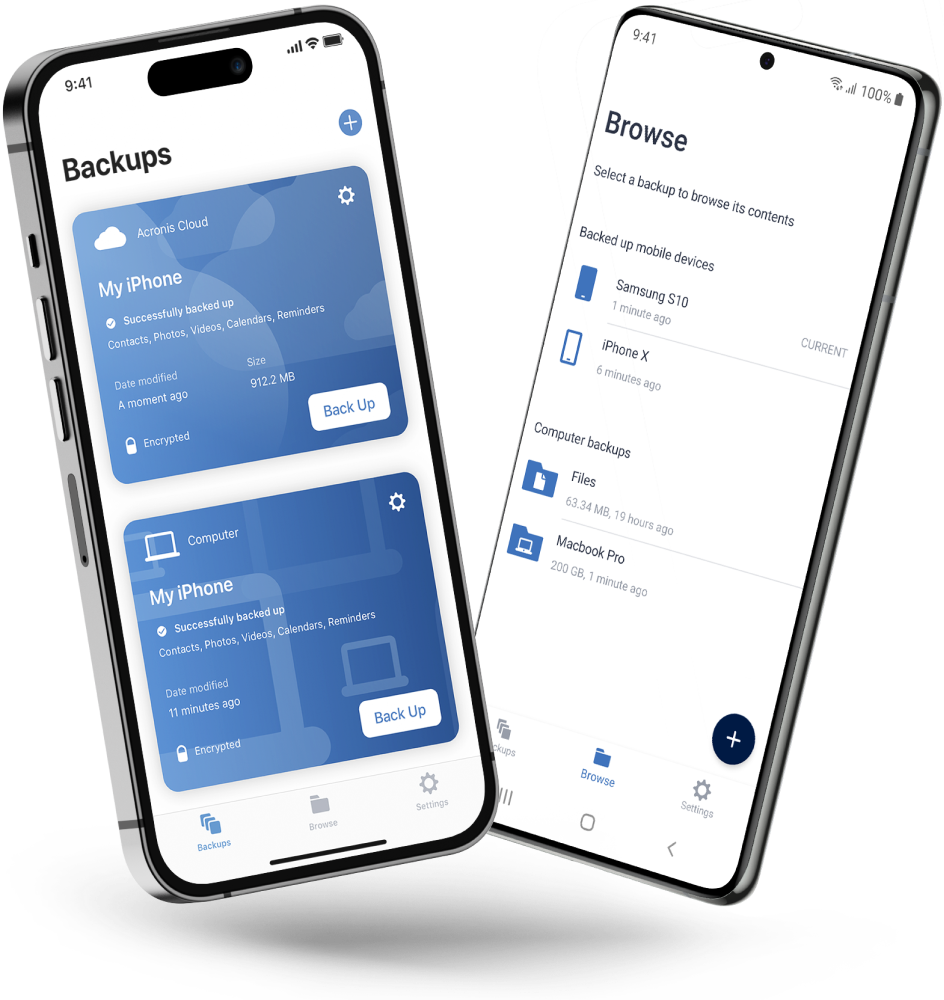
Never worry about losing your photos, videos, contacts or important files again. With the Acronis Mobile app, you can easily back up everything that matters on your phone and keep it safe in the cloud. Access your files anytime, anywhere from the Acronis Cloud, whether you're switching devices or just want peace of mind. It’s fast and always ready to protect your digital life.

  • How to back up your mobile device via Wi-Fi to a PC or Mac
Acronis Mobile: Easy, secure and portable

Looking for help?

Frequently Asked Questions

  • A reliable backup refers to the process of creating duplicate copies of your important data and storing them in a secure location, such as in the cloud, to protect against data loss or corruption. This backup should be readily accessible and able to restore your data quickly and efficiently in case of an unexpected event.

    It is crucial for the several reasons:

    1. It prevents the loss of data: Computers and storage devices can fail unexpectedly due to hardware malfunctions, viruses or human error. Having a reliable backup ensures that your important files and documents are safe even if your primary storage device fails.

    2. Protection against cyberthreats: With the increasing prevalence of cyberthreats such as ransomware and malware, having a backup ensures that you can recover your data even if it gets compromised by malicious software.

    3. Peace of mind: Knowing that your data is backed up gives you peace of mind and reduces stress associated with the possibility of losing important files and documents.

  • Acronis True Image can automate your back up process, meaning that it will do it automatically based on your needs. In addition, it will encrypt your backup to make sure it is secure, and you can backup locally, externally or to the Acronis cloud, so you can access your personal data anywhere, at any time.

  • Yes you can easily schedule automatic backups, daily, weekly or monthly to keep your backups up to date.

  • You can back up any kind of file format with Acronis True Image, including documents, photos, videos, music and more. Ensuring the security of your various digital, personal assets.

  • Yes, you can easily encrypt all your backups with a password which you can set yourself.

  • Yes, you can backup locally, to an external drive and to the Acronis cloud. It is important to do regular backups — if possible, automated, and to back up to create duplicates of your data and to store them in different secure locations.

  • It all depends on the amount of data you want to recover; but we ensure a fast and easy recovery. For more information, find out more about fast recover here

Product help
If you need product assistance, you can find helpful materials in the Knowledge Base. Or, post questions on our discussion boards.
Technical support
For subscription owners, there is free, 24-hour technical support. Refer to the Technical Support Site to find the appropriate support contact.
  • Company
    Press Releases
    Careers
    Contacts
    Cloud Data Centers
    Forum
  • Service Providers
    Resellers
    Developers and ISVs
    Affiliates
    OEMs
  • Active Protection
    AnyData Engine
    Universal Restore
    Anti-malware
    View all
  • Management
    Automation
    Security
    Data Protection
    View all
  • Acronis #CyberFit Sports
    Acronis Cyber Foundation
    TRU security
    Professional Services
  • ConnectWise
    Microsoft CSPs
  • Veeam
    Sophos
    Trend Micro
    ESET
    SentinelOne
    View all
  • Physical
    Virtual
    Cloud
    Endpoints
    Applications
    Mobile
  • About Acronis
  • Company
  • Press Releases
  • Careers
  • Contacts
  • Cloud Data Centers
  • Forum
  • For partners
  • Service Providers
  • Resellers
  • Developers and ISVs
  • Affiliates
  • OEMs
  • Technologies
  • Active Protection
  • AnyData Engine
  • Universal Restore
  • Anti-malware
  • View all
  • Integrations
  • Management
  • Automation
  • Security
  • Data Protection
  • View all
  • Programs & Services
  • Acronis #CyberFit Sports
  • Acronis Cyber Foundation
  • TRU security
  • Professional Services
  • Vendor Alliance
  • ConnectWise
  • Microsoft CSPs
  • Compare to
  • Veeam
  • Sophos
  • Trend Micro
  • ESET
  • SentinelOne
  • View all
  • Environments
  • Physical
  • Virtual
  • Cloud
  • Endpoints
  • Applications
  • Mobile
  • Acronis certification 1
  • Acronis certification 2
  • Acronis certification 3
  • Acronis certification 4
Engage with Acronis
  • twitter
  • blog
  • cpoc
  • yt
  • linkedin
  • reddit
  • facebook
  • Legal information
  • Privacy policy
  • Cookie Notice
  • Notice of collection
  • Sustainability & governance
© 2003–2026 Acronis International GmbH.
AcronisBack to homepage

Sorry, your browser is not supported.

It seems that our website is incompatible with your current browser's version. Don't worry, this is easily fixed!
To view our complete website, simply update your browser now or continue anyway.

Contact Sales for Product purchases:

United States: Workdays, 9:00 AM - 5:30 PM. Tel: +1 202-601-3104

Contact PR team:[email protected]

Press ReleasesProduct documentationSupport portalCustomer portalContactsRenewals

© 2003–2026 Acronis International GmbH. Legal information