


Back to homepage
  • For MSPs
  • AI-Native
Search in acronis websites
Login for
  • Service ProvidersAcronis Cyber Protect Cloud
  • Business CustomersAccess business security, backup, and deployment products
  • Home UsersAcronis True Image
  • Acronis Partner PortalPartner resources, training, certifications, and business tools.
  • ConnectAcronis Cyber Protect Connect
  • For MSPs
  • AI-Native

Contact us

  • Contact Sales
  • Contact Support
  • Contact Renewals
  • All Contacts
Search
Try Now
Choose region and language
Americas
  • BrasilPortuguês
  • CanadaEnglish
  • CanadaFrançais
  • LATAMEspañol
  • United StatesEnglish
Asia-Pacific
  • AustraliaEnglish
  • Chinese Simplified简体中文
  • Chinese Traditional繁體中文
  • IndiaEnglish
  • Japan日本語
  • Korea한국어
  • SingaporeEnglish
Europe, Middle East and Africa
  • BulgariaБългарски
  • CzechČeština
  • EuropeEnglish
  • FranceFrançais
  • GermanyDeutsch
  • HungaryMagyar
  • Israelעברית
  • ItalyItaliano
  • NetherlandsDutch
  • PolandPolski
  • RomaniaRomână
  • SpainEspañol
  • SwedenSvenska
  • SwitzerlandDeutsch
  • TürkiyeTürkçe
  • United KingdomEnglish
Worldwide
  • GlobalEnglish
  • Americas
    • BrasilPortuguês
    • CanadaEnglish
    • CanadaFrançais
    • LATAMEspañol
    • United StatesEnglish
  • Asia-Pacific
    • AustraliaEnglish
    • Chinese Simplified简体中文
    • Chinese Traditional繁體中文
    • IndiaEnglish
    • Japan日本語
    • Korea한국어
    • SingaporeEnglish
  • Europe, Middle East and Africa
    • BulgariaБългарски
    • CzechČeština
    • EuropeEnglish
    • FranceFrançais
    • GermanyDeutsch
    • HungaryMagyar
    • Israelעברית
    • ItalyItaliano
    • NetherlandsDutch
    • PolandPolski
    • RomaniaRomână
    • SpainEspañol
    • SwedenSvenska
    • SwitzerlandDeutsch
    • TürkiyeTürkçe
    • United KingdomEnglish
  • Worldwide
    • GlobalEnglish
Acronis True Image
FOR HOME
MenuMenu
Acronis True Image
Overview
Backup
Cloning
Security
  • Backup features
    Easy BackupEmail BackupAutomatic BackupCloud BackupMobile BackupBackup ReplicationImaging SoftwareData MigrationData RecoverySurvival Kit
  • Security features
    Anti-Malware SoftwareIdentity ProtectionAntivirus SoftwareActive ProtectionReliable CybersecurityCryptojacking BlockerSecurity for MacData Protection
  • Solutions
    Gaming SecurityCloud Photo StorageElectronic SignatureMobile App
All features
Compare
Backup
Cloning
Security
Product features
Backup features
Easy Backup
Email Backup
Automatic Backup
Cloud Backup
Mobile Backup
Backup Replication
Imaging Software
Data Migration
Data Recovery
Survival Kit
Security features
Anti-Malware Software
Identity Protection
Antivirus Software
Active Protection
Reliable Cybersecurity
Cryptojacking Blocker
Security for Mac
Data Protection
Solutions
Gaming Security
Cloud Photo Storage
Electronic Signature
Mobile App
All features
Compare
Buy now
Try now
The most reliable and efficient personal cyber protection tools

The most reliable and efficient personal cyber protection tools

Buy nowTry now
100% Detection Rate and 0 False Alarms in independent tests
Best Windows backup software, PCWorld
Cybersecurity Excellence Awards Winner
Editors' Choice, PCWorld
OPSWAT Anti-malware Platinum certification
TIME's Best Cloud Backup Services

The first solution combining cybersecurity, secure backup, and identity protection for home users

Boost your computer’s cyber security with user-friendly integrated antivirus, active ransomware protection using AI, secure backup and Identity Protection*. Giving you cyber protection from future threats and making sure your data is protected. Backup enables security as the solution learns from secondary data, making real-time data protection possible with higher quality.
The first solution combining cybersecurity, secure backup, and identity protection for home users
  • Over 5,500,000
    users worldwide
  • Over 100,000
    prevented cyberattacks last year
  • Over 500,000,000
    clones and backups

Integrated personal cybersecurity and backup for a complete cyber protection

Cyberthreats are constantly evolving. New artificial intelligence tools are making it easy for bad actors to create and distribute malware, and the amount of malware attacks is in the billions yearly. No cybersecurity software can provide 100% protection. Traditional signature-based antivirus software tools struggle to keep up with new cyber threats, and behavioral analytics can miss sophisticated malware. The best way to minimize the risk of data loss has been to have a copy of your data to recover if the protection fails by using advanced personal cyber security services

Acronis True Image takes it one step further. It has cybersecurity tools integrated with backup to provide complete personal cyber protection. Backup data improves the quality of behavior-based detection, and malware protection safeguards your backup data. Integration enhances both solutions for complete personal cyber protection and backup enabling security.

Integrated personal cybersecurity and backup for a complete cyber protection
  • Antivirus protection
    Antivirus protection
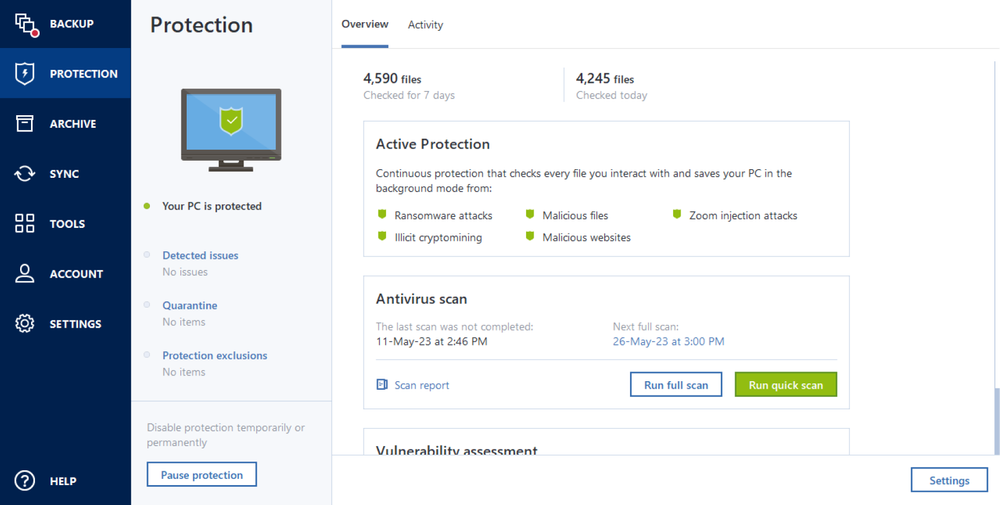
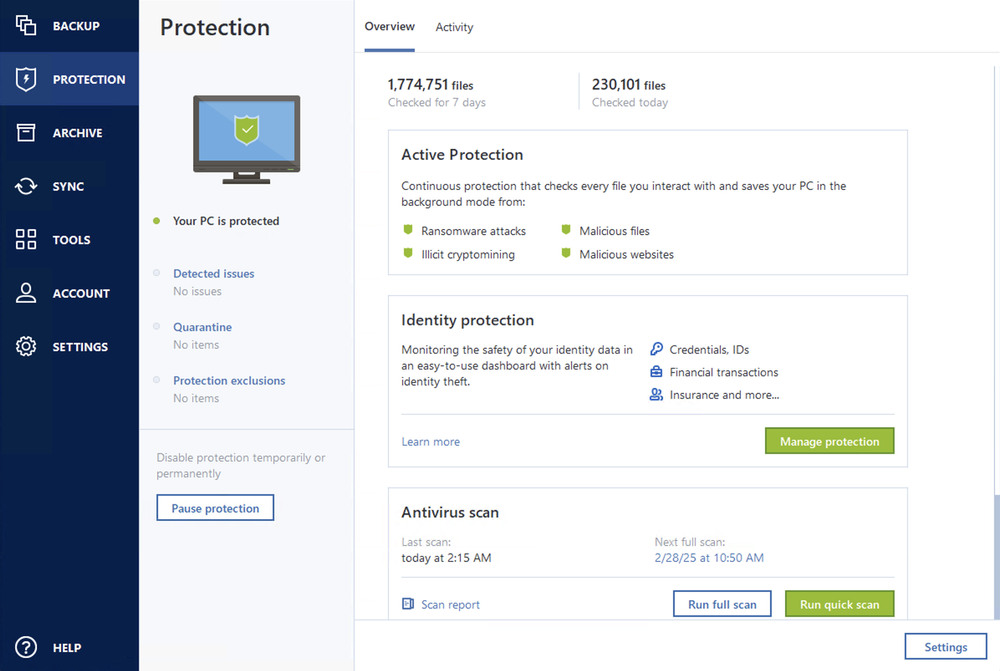
    Anti-malware and anti-ransomware protection: quick and full-scans, on-demand and scheduled and real-time protection
  • Behavioral engine
    Behavioral engine
    Detection of new strains of malware based on the behavior, not the known signatures – by using AI to give protection against new threats
  • Backup
    Backup
    Automated and manual backup and recovery options in case of data corruption caused by malware, serving as the final line of defenses

Active ransomware protection

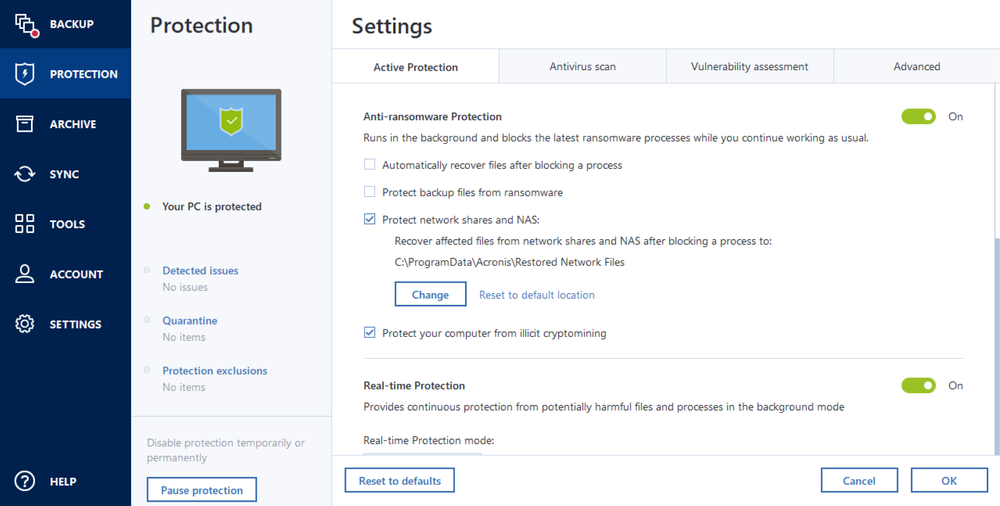
Acronis True Image provides continuous protection, monitors data modification patterns, detects typical and suspicious behaviors, and compares against malicious patterns. This effective approach excels in identifying ransomware attacks, including variants unknown before.
Active ransomware protection
  • Secure backup
    Acronis uses a strong self-defense mechanism, encryption and secure data centers to protect your personal and precious data from being stolen. Backup enables security and privacy to be protected against malware and other threats.
  • Identity Protection
    Upgrade your personal cybersecurity and safeguard your personal information with the monitoring portal, cyber insurance, and the resolution services.
  • Windows Master Boot Record monitoring
    Acronis Active Protection monitors the Windows Master Boot Record, blocking unauthorized changes to prevent attacks on the operating system and disruption of the boot process.
  • Web filtering
    Block access to malicious URLs that try to inject malware, ransomware and cryptojackers onto your system.
  • Cryptomining protection
    Stop cryptomining malware and get a notification immediately when an attack is detected — protect your windows PC resources and block attackers from illegally using it.
  • Two-factor authentication (2FA)
    Protecting your account requires two different forms of identification, such as a password and a unique verification code.

Reddit Voices

See what the community on Reddit is saying about us.

  • r/Lenovo

    “I use Acronis True Image. Still fast and reliable.”

  • r/cybersecurity

    “I use Acronis. And #1 seems to be one of their approaches. Nothing can alter a backup. You must give consent. I like this approach.”

  • r/cloningsoftware

    “Acronis has always been my go to software for any backups. They always have a way to deal with any complicated technical details associated with backups.”

  • r/WindowsHelp

    “I've been using acronis true image since like 2003 without any real issues. Stick to full disk images as opposed to incremental ones as I've had issues to restore with them at times.”

Choose the Acronis True Image plan that meets your needs

Please wait, this may take

a few seconds...

What the experts say

  • Case study
    Case study

    Renowned composer William Goldstein relies on Acronis True Image to protect his valuable music files

    “The backups I make with Acronis True Image are part of my life. They make it possible for me to access my work and be able to get back to it.”

    William Goldstein
    Grammy-nominated composer, pianist and recording artist

    Read case study
  • Case study
    Case study

    Acronis True Image has saved my career on numerous occasions

    “I was hit by a ransomware attack and a gentleman told me on the phone that I should pay a certain amount of money to get my data back. But in the back of my head, I knew that I had the ace card as I had Acronis True Image.”

    Eli Yablonovitch
    Professor of Electrical Engineering and Computer Sciences at UC Berkeley

    Read case study

Trustpilot reviews

Acronis solutions are trusted by thousands worldwide

Trustpilot

Supported platforms

Microsoft Windows

  • Windows 11 (64-bit)
  • Windows 10 (64-bit)

File systems on Windows

  • NTFS
  • Ext2/Ext3/Ext4
  • ReiserFS(3)
  • Linux SWAP
  • HFS+/HFSX
  • FAT16/32/exFAT

Apple macOS

  • macOS Tahoe 26
  • macOS Sequoia 15
  • macOS Sonoma 14
  • macOS Ventura 13
  • macOS Monterey 12

File systems on macOS

  • APFS
  • HFS+
  • FAT32
  • NTFS (including Boot Camp)

Mobile operating systems

  • iOS 15 or later
  • Android 10 or later

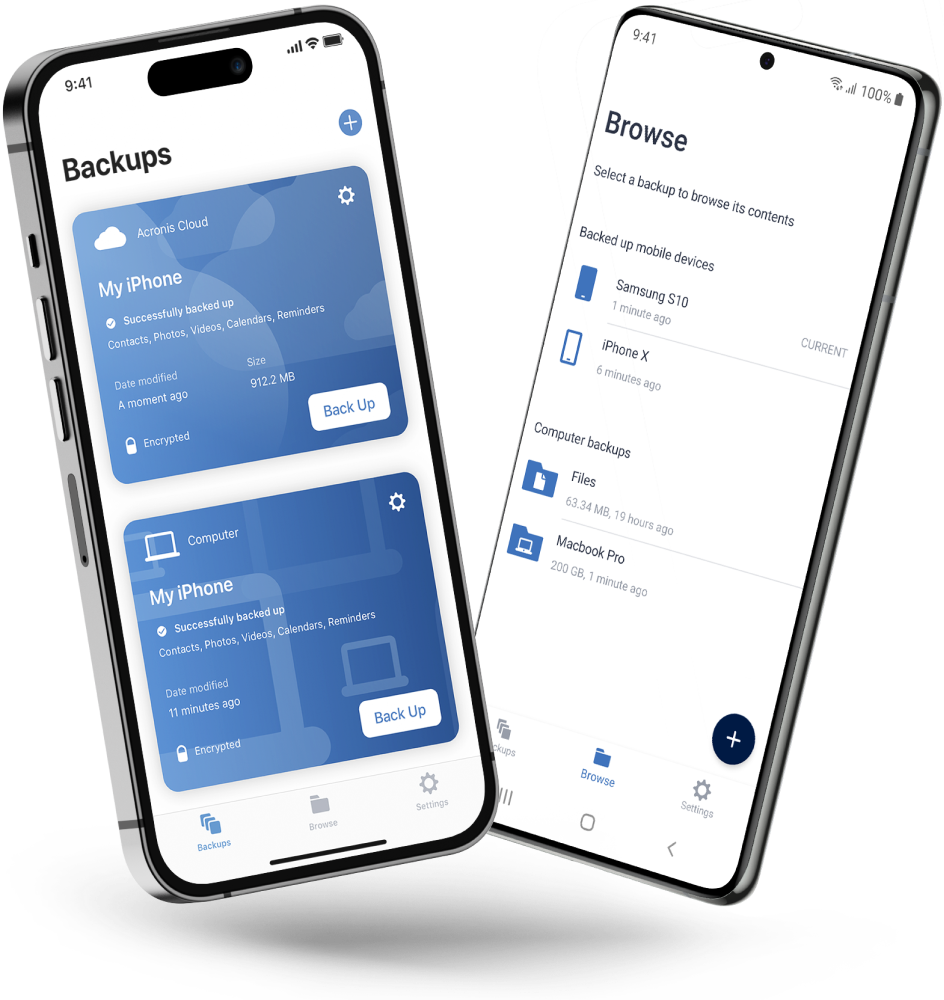
Acronis Mobile: Easy, secure and portable

Never worry about losing your photos, videos, contacts or important files again. With the Acronis Mobile app, you can easily back up everything that matters on your phone and keep it safe in the cloud. Access your files anytime, anywhere from the Acronis Cloud, whether you're switching devices or just want peace of mind. It’s fast and always ready to protect your digital life.

  • How to back up your mobile device via Wi-Fi to a PC or Mac
Acronis Mobile: Easy, secure and portable

Looking for help?

Frequently Asked Questions

  • Cybersecurity for home encompasses measures and tools to protect your personal devices and data from cyberthreats. It is essential because the criminals are using evolving technologies, and you need to make sure you have the latest software protecting your data. Acronis True Image provides an additional layer of personal cybersecurity and protects your data from the most recent viruses, worms, trojans, ransomware, cryptomining, identity theft, and other cyberthreats.

  • Acronis True Image protects your data from malware (including viruses, worms, and trojans), ransomware, cryptomining, and other cyberthreats. It also checks for vulnerabilities in your system and protects videoconference apps, as well as helps you monitor the safety of your personal information with Identity protection.

  • Yes. The private information that you share online can be leaked as a result of phishing, a malware attack, or a data breach. Active Protection detects malware, while Web filtering blocks access to phishing websites. In addition, Identity protection helps you monitor the safety of your personal information such as IDs, email addresses, credentials, financial information, among other sensitive data.

  • Yes, it is really easy to use. Just follow these instructions for Windows and for Mac.

  • Yes, Acronis True Image is a comprehensive personal cybersecurity solution, if you have an iOS or Android smartphone, you can use Acronis True Image to backup your mobile data such as photos, video files, contacts, and calendars.

  • Acronis True Image can back up your entire operating system, as well as specific files and folders. You can store the backed-up data in Acronis Cloud or your local folders, as well as on external HDDs, SSDs, USB flash drives, NAS, network shares, FTP servers, and some other storage devices.

  • Web filtering protects you from potentially harmful websites and untrusted web resources by blocking access or showing a warning when you try to open them. To determine which websites are potentially harmful, contain scams or phishing URLs, Web filtering uses a database with the latest updates.

Product help
If you need product assistance, you can find helpful materials in the Knowledge Base. Or, post questions on our discussion boards.
Technical support
For subscription owners, there is free, 24-hour technical support. Refer to the Technical Support Site to find the appropriate support contact.
  • Acronis certification 1
  • Acronis certification 2
  • Acronis certification 3
  • Acronis certification 4
Engage with Acronis
  • twitter
  • blog
  • cpoc
  • yt
  • linkedin
  • reddit
  • facebook
  • Legal information
  • Privacy policy
  • Cookie Notice
  • Notice of collection
  • Sustainability & governance
© 2003–2026 Acronis International GmbH.
AcronisBack to homepage

Sorry, your browser is not supported.

It seems that our website is incompatible with your current browser's version. Don't worry, this is easily fixed!
To view our complete website, simply update your browser now or continue anyway.

Contact Sales for Product purchases:

United States: Workdays, 9:00 AM - 5:30 PM. Tel: +1 202-601-3104

Contact PR team:[email protected]

Press ReleasesProduct documentationSupport portalCustomer portalContactsRenewals

© 2003–2026 Acronis International GmbH. Legal information